What Is Factory Management Software? A Practical Guide for Small Manufacturers
A plain-English guide to factory management software — what it does, the core modules to look for, the ROI, and how small manufacturers can roll it out without disrupting the floor.
If your factory still runs on paper slips, a whiteboard, and three different spreadsheets that never quite agree, you already know the cost: material goes missing, batches can't be traced, and the month-end numbers take a week to reconcile. Factory management software exists to close exactly those gaps — and it no longer requires an enterprise budget to adopt.
This guide explains what factory management software actually is, the modules that matter, the return you should expect, and how a small manufacturer can roll it out without bringing the floor to a halt.
What factory management software actually does
At its core, factory management software replaces disconnected record-keeping with one real-time source of truth for three things every manufacturer lives and dies by:
- Materials — what you have, where it is, and which batch it came from.
- Production — what was issued to each machine, what came back, and what was produced or wasted.
- Money — purchases, sales, supplier and customer balances, and stock valuation.
When those three live in the same system, a question like "How much of batch #4471 is left, and what did it cost us?" takes seconds to answer instead of an afternoon of cross-referencing.
The core modules to look for
Not every platform is built the same. These are the building blocks that separate a genuine factory system from a glorified spreadsheet.
1. Ledger-based inventory
The single most important feature is strict, ledger-based inventory — every material movement is a recorded transaction, not an editable cell. That is what gives you financial-grade tracking: you can always trace a unit of stock back to the purchase it came in on and forward to the product it left in.
Look for automated FEFO (First-Expired-First-Out) batch handling and configurable reorder thresholds so you stop losing stock to expiry and stop getting blindsided by stockouts. We go deep on this in FEFO vs FIFO: which inventory method should your factory use?.
2. Production management
You want to issue raw materials to a machine, track surplus returns, and record finished goods through a digitized slip system — so output and wastage are visible across every shift instead of buried in a supervisor's notebook.
3. Real-time analytics and ledgers
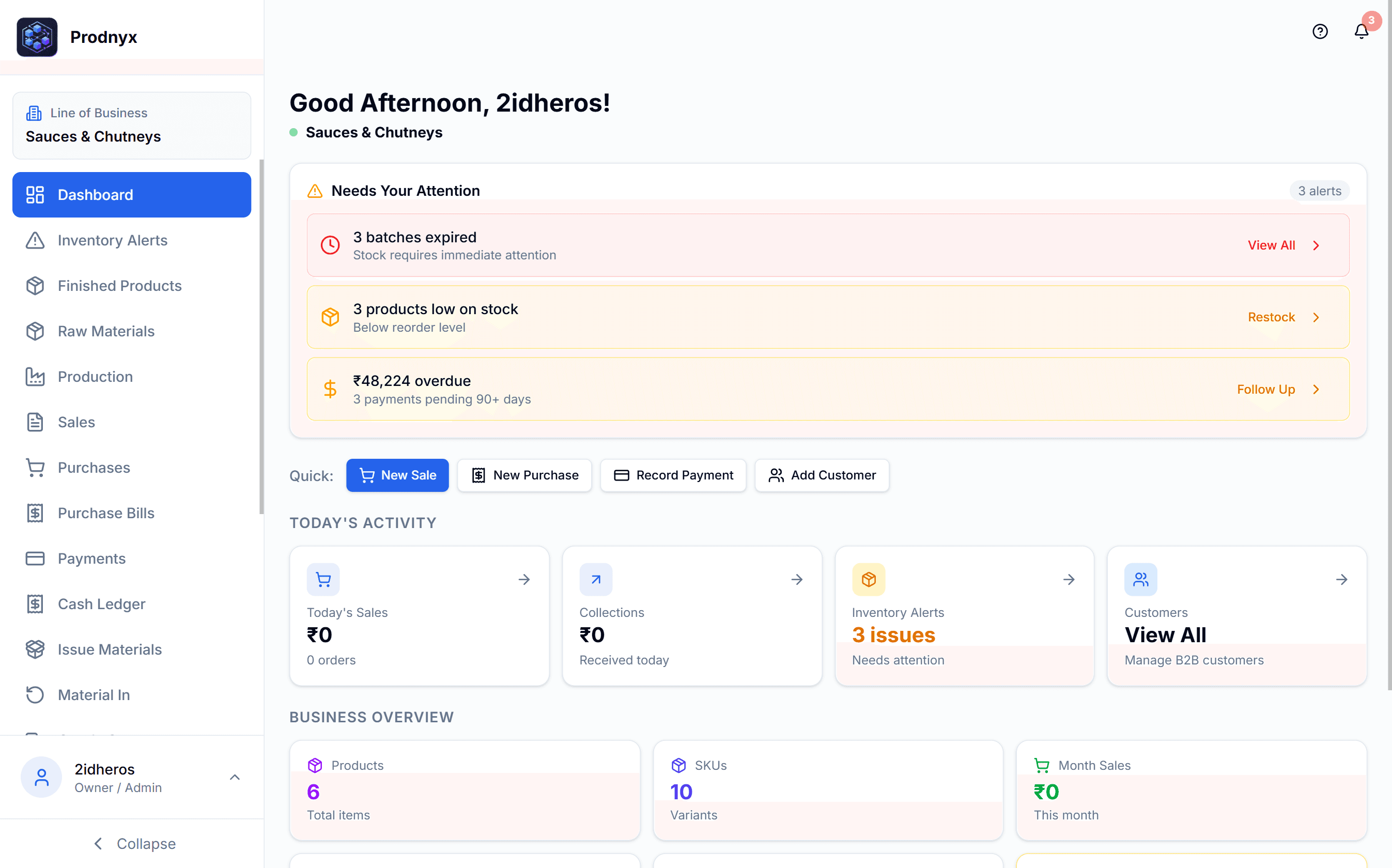
Dashboards should show sales revenue, purchase bills, cash-flow ledgers, live stock valuation, and supplier/customer balances. The goal is simple: leadership sees the same numbers the floor sees, at the same time.
4. Role-based access
A store keeper, a machine operator, and a finance manager need very different tools. Role-based access means each person sees only what their job requires — which improves both security and adoption.
The ROI: where the money actually comes from
Manufacturers rarely buy software for software's sake. The return shows up in four concrete places:
- Less material wastage. Automated FEFO and expiry alerts mean fewer batches written off. For many facilities this single change pays for the system.
- Fewer stockouts. Smart reorder thresholds keep lines running instead of idling while you wait on a supplier.
- Faster, cleaner books. When purchases and sales reconcile automatically, month-end shrinks from days to hours.
- Better decisions. Real-time output and cost data means you spot a failing line or a margin problem while you can still act on it.
A production supervisor we work with put it bluntly: replacing paper-based material tracking gave them batch-level traceability and real-time stock visibility across every machine — overnight.
How to roll it out without disrupting the floor
The biggest fear small manufacturers have is downtime. The way to avoid it is to digitize incrementally:
- Map your current flow. Document how material moves today, from goods-in to dispatch. Don't try to fix it yet — just capture it.
- Start with one line. Put a single production line on the system, mirror your existing process, and let the team get comfortable.
- Track with precision. Once slips and stock movements are flowing in, turn on batch tracking and reorder thresholds.
- Analyze, then scale. Use the first line's data to prove the ROI, then expand line by line until the whole floor is digital.
This staged approach is exactly how Prodnyx, our own factory management platform, is designed to be adopted — one line at a time, with a free Starter tier so you can prove value before you commit.
What to avoid
A few warning signs when you evaluate options:
- Editable inventory. If stock levels can be overwritten without a transaction trail, you don't have traceability — you have a spreadsheet with extra steps.
- No role separation. A system where everyone shares one login won't survive an audit or scale past a handful of users.
- Heavyweight ERPs you'll never fully use. A small factory rarely needs a six-month enterprise implementation. A focused, floor-first tool you can adopt in weeks usually wins.
The bottom line
Factory management software is no longer a luxury reserved for large plants. For a small manufacturer, the right platform turns scattered paper and spreadsheets into a single, traceable, real-time picture of materials, production, and money — and it pays for itself through reduced wastage and faster books.
Start small, prove it on one line, and scale on your own terms. If you'd like to see what that looks like in practice, take a tour of Prodnyx or book a quick demo.
Frequently asked questions
- What is factory management software?
- Factory management software is a single platform that digitizes how a manufacturing facility tracks inventory, runs production, and records its books. Instead of paper slips and disconnected spreadsheets, it gives every team — store, floor, and finance — one real-time source of truth for materials, output, and money.
- Do small factories really need it, or is it only for large plants?
- Small and mid-sized factories often benefit the most. They feel material wastage, stockouts, and reconciliation errors more acutely because margins are tighter, and modern cloud tools are now affordable enough that you no longer need an enterprise budget to get enterprise-grade traceability.
- How long does it take to implement?
- A focused rollout of a cloud factory platform typically takes days to a few weeks, not months. The fastest path is to digitize one production line first, prove the workflow, then expand line by line.
- What is the difference between factory management software and an ERP?
- A traditional ERP is a broad, often heavy system covering the whole enterprise. Factory management software is purpose-built for the production floor and its inventory and ledgers, so it is lighter, faster to adopt, and shaped around how a factory actually operates day to day.
Ready to launch fast and scale smart?
Kaelix Technologies builds rapid, AI-powered software for growing businesses. Tell us your workflow and we'll show you what's possible.